Apera Instruments PC60 (AI316) Review & Complete Reference (2026): 5-in-1 pH/EC/TDS/Salinity/Temp
Disclosure: This page contains affiliate links. If you purchase through our links, we may earn a commission at no extra cost to you. See our affiliate disclosure.
Source: Official PC60 User Manual v8.3 (Apera Instruments, LLC) • Amazon Overall Pick • 300+ bought/month • 4.5 stars (1,200+ reviews)
AI316 • IP67 Waterproof • Replaceable PC60-E Probe • ISO 9001:2015 • RoHS • CE • $147.58
What the PC60 Measures — Five Parameters, One Probe
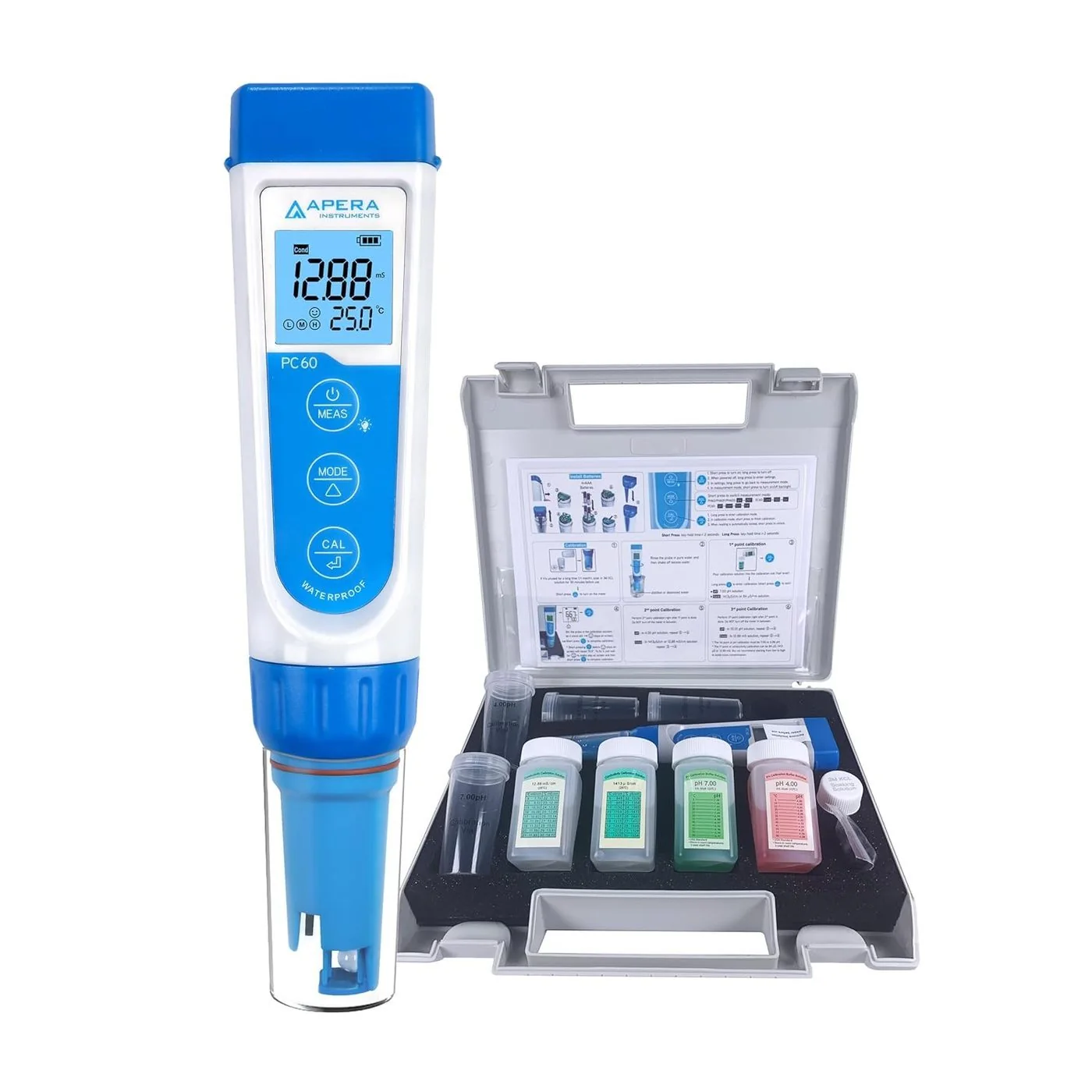
The PC60-E is a combination probe housing two distinct sensing technologies in one assembly: a pH glass membrane electrode and a platinum black conductivity sensor. A single immersion gives you all five parameters simultaneously. This is the instrument’s core value proposition — and understanding how the five parameters relate to each other matters for interpreting the results.
| Parameter | Range | Resolution | Accuracy | What It Tells You |
|---|---|---|---|---|
| pH | 0–14 | 0.01 pH | ±0.01 pH | Hydrogen ion activity; acidity/alkalinity. Critical for chemical reactions, disinfection efficacy, corrosion potential, and biological processes. |
| Conductivity (EC) | 0–20 mS/cm | 0.01–0.1 mS/cm | ±1% FS | Ability of water to conduct electricity; directly proportional to dissolved ionic content. Higher EC = more dissolved salts/minerals. |
| TDS | 0–10 ppt (mg/L) | 1–10 mg/L | ±1% FS | Total dissolved solids calculated from EC using a TDS factor (default 0.5). RO performance metric: compare influent vs effluent TDS for rejection ratio. |
| Salinity | 0–10 ppt | 0.01 ppt | ±1% FS | Calculated from EC. Relevant for seawater applications, aquaculture, and desalination monitoring. |
| Temperature | 32–122°F (0–50°C) | 0.1°C | ±0.5°C | Automatic temperature compensation (ATC) applied to pH and EC measurements. Displayed simultaneously with all other parameters. |
| TDS = EC × TDS factor (default 0.5, adjustable P3 setting 0.40–0.90). Salinity = derived from EC at measured temperature. All EC-derived parameters recalibrated simultaneously with one conductivity calibration. | ||||
Keypad Reference — Short Press vs Long Press
The PC60 has three physical buttons. The most important thing to understand before using the instrument is that every button has two functions: a short press (tap, under 2 seconds) and a long press (hold, over 2 seconds). These are distinct actions that trigger completely different responses.
| Button | Short Press (<2 sec) | Long Press (>2 sec) |
|---|---|---|
| MEAS (top, with backlight icon) | Power on from off state; toggle backlight during measurement | Enter Parameter Settings mode (P1–P8) — only works when powered OFF; hold in Settings to exit |
| MODE (middle, with triangle) | Cycle through measurement parameters: pH → Cond → TDS → Sal → Temp → pH | Power off; in Settings: cycle to next parameter (P1→P2→…P8) |
| CAL (bottom, with check mark) | Confirm calibration point; in Settings: select/change parameter value | Enter calibration mode from measurement screen (screen turns GREEN) |
| The GREEN screen indicates calibration mode. The stability indicator (smiley face ☺) must appear and remain before confirming any calibration point. | ||
First Use — Before You Take Any Measurement
Pull the battery insulation slip
The PC60 ships with a plastic slip in the battery compartment to prevent drain during transit. Pull it out before first power-on.
Remove probe cap — check for KCl solution
The probe cap ships with 3M KCl soaking solution inside. This is correct storage. If the probe arrived dry or was stored dry, soak the probe tip in 3M KCl solution for 15 minutes before proceeding.
Rinse probe in pure water — shake off excess
Use distilled, deionized, or RO water. Never wipe the pH glass membrane — shake off excess water only. Wiping generates static that interferes with pH measurement.
Perform pH calibration (Section below)
Start with the pH 7.00 buffer. Complete at minimum a 1-point calibration before any pH measurements.
Perform conductivity calibration (Section below)
One conductivity calibration covers EC, TDS, salinity, and resistivity simultaneously.
pH Calibration — Complete Procedure
pH calibration is the most critical maintenance step. The PC60 supports 1, 2, or 3-point calibration and automatically recognizes five standard pH buffer solutions in both USA and NIST series (pH 1.68, 4.00, 6.86, 7.00, 9.18, 10.01, 12.45).
Which Calibration Points to Use
| Calibration Type | Buffers Used | Icons Confirmed | Best For |
|---|---|---|---|
| 1-Point (minimum) | pH 7.00 only | M (Middle) | Samples expected near neutral pH; quick field checks |
| 2-Point (recommended) | pH 7.00 + pH 4.00 or 10.01 | M + L or M + H | Acidic samples (wastewater, pool water): use 4.00. Alkaline samples: use 10.01 |
| 3-Point (full range) | pH 7.00, 4.00, and 10.01 | M + L + H | Samples with unknown or widely varying pH; compliance monitoring |
Power on — short press MEAS
Confirm display is in pH mode. If not, short press MODE to cycle to pH.
Pour buffers into calibration vials — half volume
Use the labeled calibration vials included in the kit. Half-fill with the appropriate buffer solutions.
Always start with pH 7.00 buffer first
The PC60 requires the midpoint buffer first. Starting with pH 4.00 or 10.01 will cause calibration failure. Dip rinsed probe into pH 7.00 vial. Stir briefly, hold still.
Long press CAL — screen turns GREEN
Green screen confirms calibration mode is active.
Wait for smiley face ☺ to appear AND remain — then short press CAL
Do not press CAL while the reading is still changing. The smiley face must be stable. Premature confirmation locks in a drifting value and produces inaccurate results. M icon appears on screen = 1-point calibration complete.
For 2 or 3-point: rinse probe — dip in next buffer — wait for stability — short press CAL
Do NOT power off between calibration points — doing so resets the calibration and you must start over. L icon (pH 4.00) or H icon (pH 10.01) appears after each additional point.
Conductivity Calibration — Covers EC, TDS, Salinity, and Resistivity
One conductivity calibration simultaneously calibrates all four derived parameters. The PC60 accepts up to 3-point conductivity calibration using three standard solutions.
| Calibration Standard | Concentration | Use When |
|---|---|---|
| 1413 μS/cm (primary) | Medium-range standard | Always use as the first (or only) calibration point; covers most water treatment and environmental monitoring applications |
| 84 μS/cm (low-range) | Low-concentration standard | Add for 2-point if measuring very low conductivity samples (high-purity RO water, distilled water) |
| 12.88 mS/cm (high-range) | High-concentration standard | Add for 2-point if samples may exceed 2 mS/cm (seawater, highly concentrated process water, cooling tower blowdown) |
Short press MODE to switch to Cond (conductivity) measurement mode
The display must show Cond before entering calibration. Conductivity calibration cannot be initiated in pH mode.
Rinse probe in pure water, pour 1413 μS standard into calibration vial, dip probe
Stir briefly to remove air bubbles from the conductivity cell, hold still.
Long press CAL (screen turns GREEN) — wait for stability — short press CAL
M icon appears confirming 1-point conductivity calibration. EC, TDS, salinity, and resistivity are all calibrated from this single step.
For 2-point: rinse — dip in 12.88 mS standard — long press CAL — wait — short press CAL
H icon appears. Do not power off between points.
Taking Measurements — Standard Procedure
Rinse probe thoroughly in pure water — shake off excess (never wipe)
Cross-contamination from the previous sample or calibration buffer will affect the next reading. Always rinse between samples.
Dip probe at least 1 inch (25 mm) into sample — stir briefly — hold still
The probe must be immersed deep enough to cover both the pH glass bulb and the conductivity sensor. Brief stirring removes air bubbles from the conductivity cell. Bubbles trapped in the cell produce falsely low conductivity readings.
Wait for the smiley face ☺ stability icon to appear AND remain
Do not record a reading until the stability indicator is present and steady. In pure water samples (RO, distilled, DI), pH stabilization may take 1–5 minutes — this is normal and does not indicate a problem.
Short press MODE to switch between parameters without removing from sample
All five parameters are available from a single immersion. Cycle through pH → Cond → TDS → Sal → Temp without lifting the probe. Record all parameters needed before removing.
Probe Care — The Most Important Maintenance Requirement
Storage — Always in 3M KCl, Never Dry or in Pure Water
Routine Cleaning (After Every Measurement)
Rinse probe in pure water from a wash bottle or container
Always rinse before and after each measurement session.
Shake off excess — never rub or wipe the glass membrane
Fingerprints and static electricity from wiping the pH glass membrane cause measurement errors. Shake off water droplets. If gentle dabbing is needed, use a lint-free Kimwipe with a dabbing (not rubbing) motion only on the sides of the probe, not on the glass bulb directly.
Replace probe cap with KCl solution inside for storage
The probe tip must remain moist in KCl between measurement sessions.
Deep Cleaning (Tough Contaminants)
Remove the sensor shield from the probe tip
Exposes the conductivity cell and pH glass for thorough cleaning.
Soak in probe cleaning solution (AI1166) or dilute detergent — 30 minutes
Loosens biological material, scale, oil, and process residues.
Gentle brush to remove remaining contaminants
Use a soft brush only. Never use abrasive materials on the glass membrane or conductivity electrodes.
Soak in 3M KCl for at least 1 hour after cleaning
Cleaning disrupts the reference junction and membrane equilibrium. A 1-hour KCl soak is required to restore proper electrode function before re-calibrating and measuring.
Rinse with pure water — re-calibrate before use
Always recalibrate after deep cleaning.
Parameter Settings (P1–P8) — Complete Reference
Access settings by powering OFF the instrument, then long-pressing MEAS. The display cycles P1 through P8. Short press MODE to advance, short press CAL to select, short press MODE to change value, short press CAL to confirm.
| Setting | Function | Options | Default |
|---|---|---|---|
| P1 | pH buffer standard series | USA (4.00/7.00/10.01) or NIST (4.00/6.86/9.18) | USA |
| P2 | Automatic shut-off timer | 5 min / 10 min / 30 min / Off | 10 min |
| P3 | TDS conversion factor (EC × factor = TDS) | 0.40 – 0.90 in 0.01 steps | 0.50 |
| P4 | Temperature compensation coefficient (%/°C) | 0.00–4.00%/°C | 2.0%/°C (linear) |
| P5 | Conductivity unit display | μS/cm or mS/cm | μS/cm |
| P6 | Temperature unit | °C or °F | °C |
| P7 | Stability indicator sensitivity | Fast / Normal / Slow | Normal |
| P8 | Factory reset | No / Yes | No — selecting Yes clears all calibration data |
| P3 TDS factor: the default 0.50 is appropriate for most natural waters. Adjust to 0.65–0.70 for KCl-dominant solutions (cooling tower blowdown with KCl treatment). Use the conductivity reading for the most reliable dissolved solids measurement — TDS is a calculated approximation. | |||
Probe Replacement
The PC60-E is a consumable. Replace when: pH stabilization is persistently slow despite proper KCl soaking and cleaning; calibration requires an unusually large slope correction; or readings are inconsistent across replicate measurements on the same sample despite correct technique.
Screw off the probe ring counterclockwise
The probe ring threads counterclockwise to remove.
Unplug old probe — align new probe carefully before plugging in
The connector has a correct orientation. Never force the probe connector. Damage from forced insertion is not covered under warranty. Align first, then press in gently until seated.
Screw probe ring back on clockwise — soak new probe in KCl 5–15 minutes
New probes need KCl conditioning before calibration and measurement.
Consider factory reset (P8 = Yes) to clear old calibration data
Old calibration data from the previous probe is stored in memory and may produce inaccurate results with the new probe. Factory reset clears all calibration — then recalibrate with fresh buffers and standards.
Troubleshooting
| Symptom | Likely Cause | Resolution |
|---|---|---|
| pH reading drifts continuously, won’t stabilize | Probe stored in pure water or dry; glass membrane dehydrated | Soak probe in 3M KCl for 15–30 minutes; recalibrate. If persistent after 30 min soak, replace probe. |
| pH reading unstable in pure water (5+ minutes) | Normal behavior — low ion concentration weakens signal | Add 1 mL KCl per 1000 mL sample; pre-soak probe in pH 4.00 buffer for 30 sec before measuring. Not a fault. |
| Calibration fails or buffer not recognized | Wrong buffer series selected in P1; contaminated buffer solution; probe dirty | Check P1 setting (USA vs NIST); replace contaminated buffer solutions; deep clean probe and soak in KCl 1 hour; recalibrate |
| EC/TDS reads zero or very low | Air bubble trapped in conductivity cell; probe not immersed deep enough | Stir probe vigorously in sample to expel bubbles; ensure probe immersed at least 25 mm; check conductivity calibration |
| All readings off by consistent offset | Calibration data from old probe still in memory after probe replacement | Factory reset (P8 = Yes); recalibrate with fresh standards |
| Display shows “Err” | Probe not connected; damaged probe connector; sample outside measurement range | Check probe connection; verify probe ring is fully threaded; check if sample is within specified ranges |
| Battery life short | Backlight left on; auto-shutoff disabled | Toggle backlight off (short press MEAS during measurement); verify P2 auto-shutoff is set appropriately |
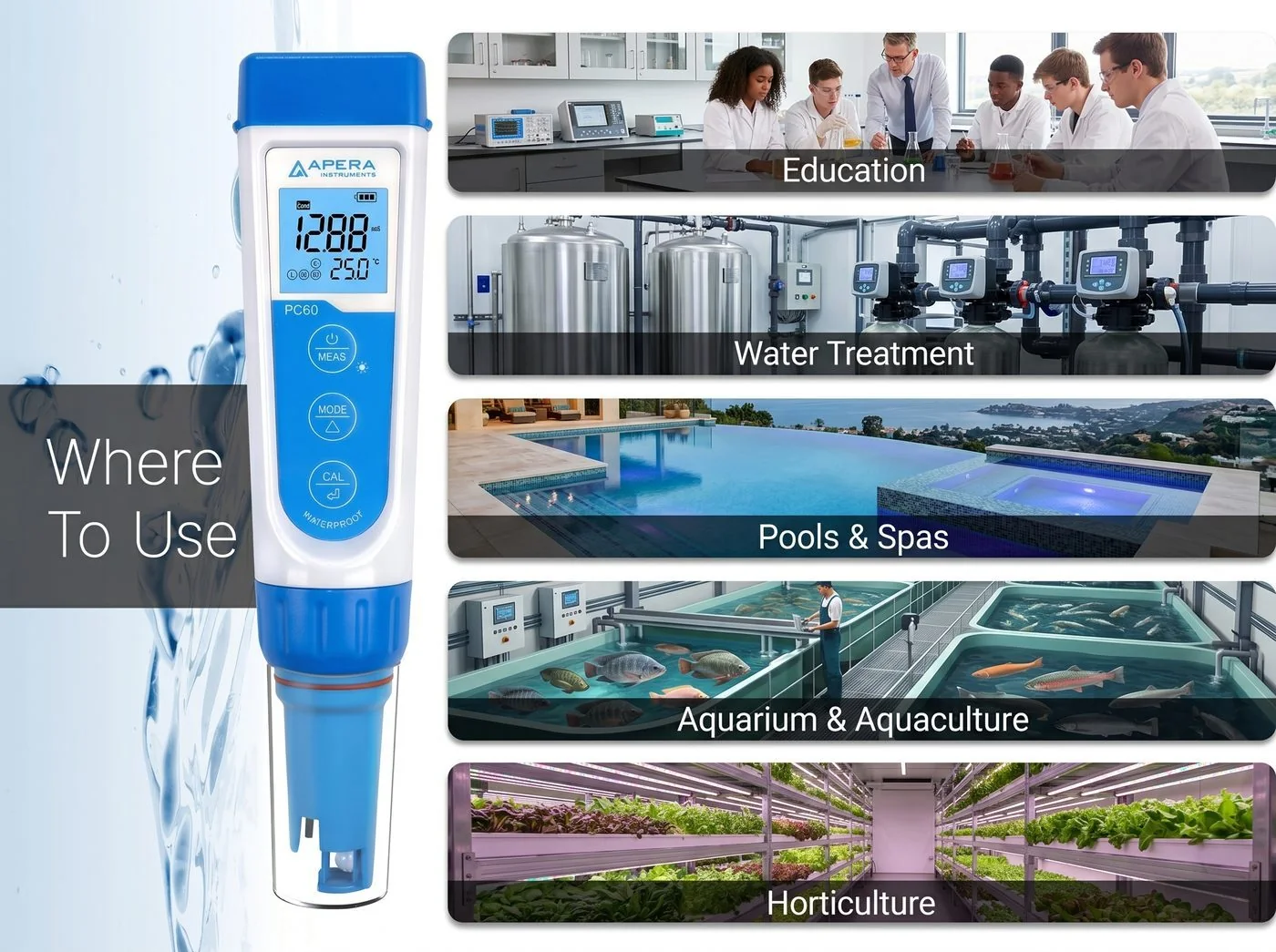
Application Matrix — Water Treatment Context
| Application | Primary Parameters | Typical Ranges | Notes |
|---|---|---|---|
| RO system performance | TDS (feed vs. permeate) | Feed: 200–800 mg/L; Permeate: <50 mg/L | TDS rejection = (feed–permeate)/feed × 100%. >95% is typical for a healthy membrane. |
| Softener influent/effluent | EC, TDS, pH | EC change minimal; pH may rise slightly | Softening exchanges Ca/Mg for Na — TDS changes little. Verify with hardness test, not TDS alone. |
| Cooling tower water | EC, TDS, pH | EC 1,000–5,000 μS/cm; pH 7.0–9.0 | High EC indicates need for blowdown. pH outside range affects scale/corrosion balance and biocide efficacy. |
| Pool & spa | pH, TDS | pH 7.2–7.6; TDS <1,500 mg/L (pool) | pH is the primary driver of chlorine efficacy and equipment corrosion. TDS accumulates over time — drain/refill when needed. |
| Hydroponics nutrient solution | EC, pH | EC 0.8–3.0 mS/cm; pH 5.5–6.5 | EC tracks nutrient concentration; pH governs nutrient availability. Both must be monitored and adjusted daily in active systems. |
| Aquaculture / recirculating systems | pH, EC, Temp | pH 6.5–8.5 (species-dependent); Temp varies | TDS accumulates in recirculating systems; EC is the fastest indicator. Salinity mode relevant for marine species. |
| Wastewater process control | pH, EC | Influent pH 6–9; EC highly variable | pH critical for biological treatment; EC indicates dissolved solids load. Use for rapid field screening before lab analysis. |
PC60 vs Hach DR900 — Complementary, Not Competing
The most important context for water quality professionals: the PC60 and the Hach DR900 (or DR300 series) are not alternatives — they measure completely different parameters using different physics and are both needed for a complete water quality picture.
How: Direct probe contact; ion exchange (pH) and conductance (EC)
Cannot measure: Chlorine, iron, phosphate, ammonia, nitrate, COD
Best for: Process monitoring, RO performance, nutrient solutions, quick field screening
How: Light absorbance of chemically treated samples
Cannot measure: pH, EC, TDS, salinity directly
Best for: Chemical parameter compliance, contaminant monitoring, disinfectant residuals
What’s in the Kit
| Item | Qty | Purpose |
|---|---|---|
| AI316 / PC60 tester (with PC60-E probe installed) | 1 | Instrument; probe pre-installed and conditioned in KCl |
| Carrying case (hard-shell) | 1 | Field transport; holds instrument and all accessories securely |
| pH 4.00 calibration solution | 1 bottle | Low-point pH calibration; 2-point or 3-point calibration |
| pH 7.00 calibration solution | 1 bottle | Midpoint pH calibration; always calibrate here first |
| pH 10.01 calibration solution | 1 bottle | High-point pH calibration; 3-point calibration for alkaline range |
| 84 μS/cm conductivity calibration solution | 1 bottle | Low-range conductivity calibration |
| 1413 μS/cm conductivity calibration solution | 1 bottle | Primary conductivity calibration standard |
| Calibration vials (labeled) | Set | Pour calibration solutions here; reusable per buffer limits |
| 3M KCl soaking solution | 1 bottle | Probe storage; in probe cap during normal storage |
| 4 × AAA batteries | Installed | Pre-installed; pull insulation slip before first use |
| Quick start guide / instruction card | 1 | Laminated quick reference; keeps in carrying case lid |
| No additional accessories required for immediate use. Probe cleaning solution (AI1166) and replacement probes (PC60-E) are available separately from Apera Instruments. | ||
Related Instrument References
- Measuring TDS in Water — What Your Meter Actually Measures
- Hydroponics EC, TDS & pH Guide — crop targets, calibration, ppm conversion
- Myron L Ultrameter II 6PIIFCE — 7-parameter professional meter with FCE™ free chlorine and 442™ Natural Water standard
- Apera PH60 (AI311) — Portable pH/mV/ORP/Temp Tester, $79.76
- Apera PH700 (AI501) — Benchtop Lab pH Meter, 50-Point Data Log
- Hach DR300 Chlorine — Free & Total, DPD Method (colorimetric complement to the PC60)
- Hach DR300 Phosphate — Methods 8048 & 8007
- Hach DR300 Ammonia — Nessler & Salicylate Methods
- Hach DR300 Nitrate — Cadmium Reduction Method 8039
- Hach DR900 Multiparameter Colorimeter — 48+ Parameters
- Hach DR1900 Portable Spectrophotometer — 340–800 nm
- Colorimeter vs Spectrophotometer — Buyer’s Guide
- YSI Pro20 & Pro20i — Dissolved Oxygen & Temperature Meter
- All Commercial Water Lab Guides