Hach DR900 Multiparameter Colorimeter: Complete Review & Reference (2026)
Disclosure: This page contains affiliate links. If you purchase through our links, we may earn a commission at no extra cost to you. See our affiliate disclosure.
Source: Hach DR 900 User Manual DOC022.97.80344, Edition 4, April 2022 • DR900 Methods Reference DR900_CMS_block.pdf
Product No. 9385100 • 90+ Methods • 48+ Parameters • 420 / 520 / 560 / 610 nm • IP67 • 500 Results Storage
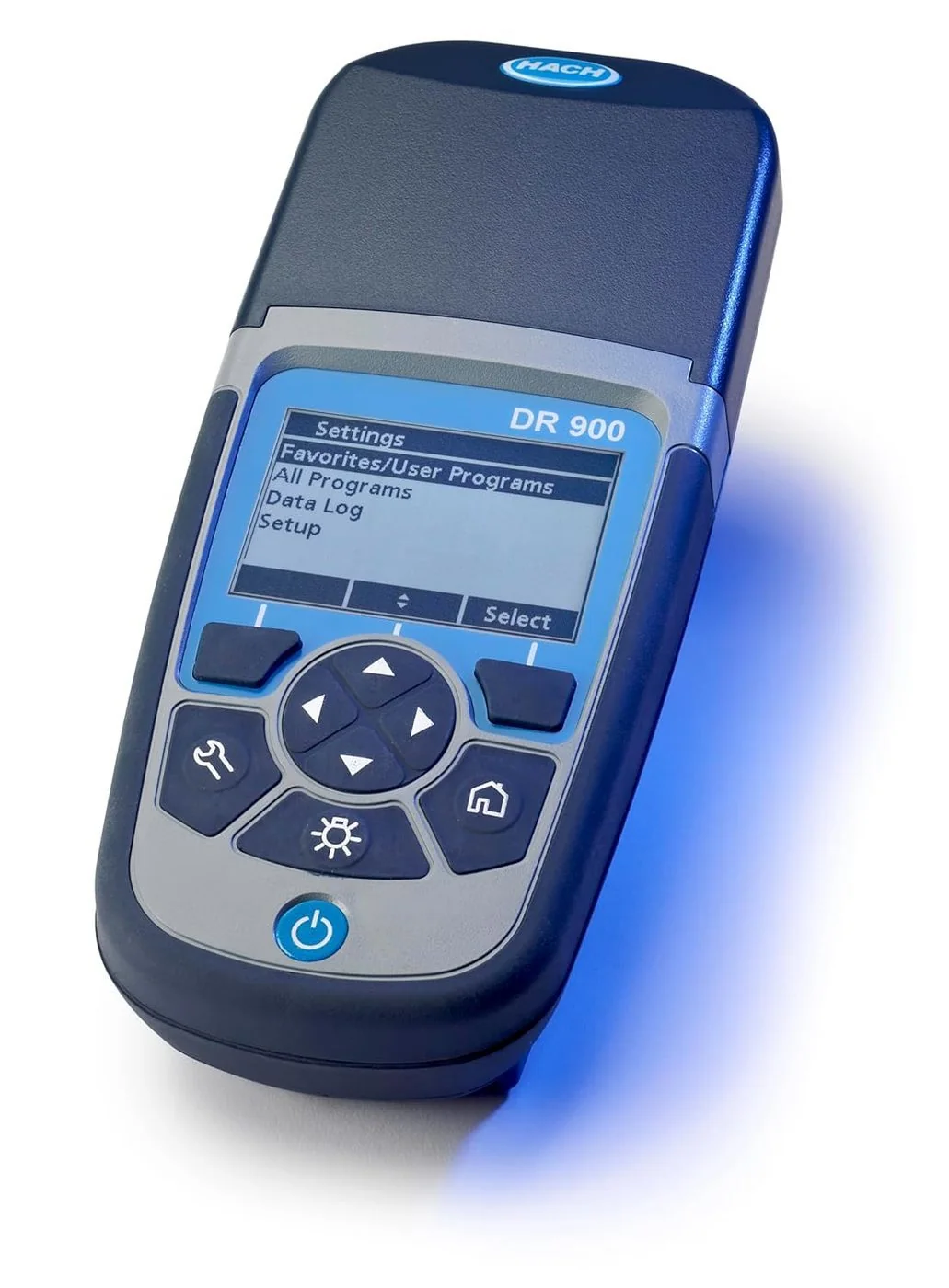

DR900 vs DR300 — Which Instrument Do You Need?
The single most important thing to understand about the DR900: it is a fundamentally different class of instrument from the single-parameter DR300 Pocket Colorimeters. The DR300 family (chlorine, iron, phosphate, bromine) is built for one parameter per instrument at one fixed wavelength. The DR900 measures 48+ parameters across four wavelengths from a single device. That difference drives every purchasing decision.
✓ Lower instrument cost
✓ Simpler operation — 2 buttons
✓ Compact — fits in a shirt pocket
✓ IP67 waterproof
✗ No data logging or USB export
✗ One instrument per parameter
✗ No Standard Adjust or user programs
Best for: routine monitoring of a single parameter at one site; low budget; minimal data management needs.
✓ 500-result data log + USB export
✓ Standard Adjust calibration
✓ Operator & Sample ID tagging
✓ User-programmable methods
✓ Favorites in <4 key presses
✓ IP67 + drop-tested
✗ Higher instrument cost
Best for: multi-parameter monitoring; compliance reporting with data records; field operators covering multiple sites or test types.
| Feature | DR300 (single-param) | DR900 (multiparameter) |
|---|---|---|
| Parameters per instrument | 1 | 48+ |
| Pre-programmed methods | 1 | 90+ |
| Wavelengths | 1 (fixed) | 4 (420, 520, 560, 610 nm) |
| Data logging | None | 500 results with timestamp |
| USB connectivity | None | USB mini — CSV export |
| Operator/Sample ID | None | Yes (10 IDs each) |
| Standard Adjust | SCA only | Full Standard Adjust |
| User programs | None | Up to 10 (custom + favorites) |
| Sample cells | Model-specific | 16 mm vial, 25 mm round, 1 cm plastic |
| IP rating | IP67 | IP67 + drop-tested |
| Batteries | 4× AAA | 4× AA |
Complete Technical Specifications
| Specification | Value |
|---|---|
| Product number | 9385100 |
| Light source | LED at 420, 520, 560, and 610 nm |
| Wavelength selection | Automatic based on selected program |
| Pre-programmed methods | 90+ methods |
| Parameters covered | 48+ |
| User programs / favorites | Up to 10 combined |
| Data storage | 500 results (data log) |
| Data export | USB mini — DR900_DataLog.csv and DR900_EventLog.csv |
| Operator IDs | Up to 10 |
| Sample IDs | Up to 10 |
| Display | Backlit LCD |
| Keypad | 6 keys: POWER, HOME, SETTINGS, BACKLIGHT, navigation d-pad, 2 soft keys |
| Sample cells accepted | 16-mm glass test vials (with adapter); 25 mm (1-inch) round glass cells; 1 cm / 10 mL plastic cells |
| IP rating | IP67 waterproof (submersible to 1 m for 30 min) |
| Drop resistance | Drop-tested per IEC 68-2-32 |
| Power source | 4× AA alkaline batteries |
| Languages | English, French, Spanish, Portuguese, Chinese (Simplified), Japanese, Korean, Thai, Arabic |
| Manual | DOC022.97.80344, Edition 4 (April 2022) |
Sample Cells — Three Types, One Compartment
The DR900 accommodates all three Hach sample cell formats through a single cell compartment using a removable cell adapter. Using the wrong cell type or omitting/including the adapter incorrectly will produce inaccurate results — the optical path length changes with cell diameter.
| Cell Type | Size | Adapter Required | Common Use |
|---|---|---|---|
| 16-mm glass test vial | 16 mm diameter | Yes — adapter must be installed | Most Hach reagent kit methods; the most common cell type across the 90+ methods |
| 25 mm round glass cell | 1-inch (25 mm) diameter | No — insert directly | DR300-compatible methods (chlorine DPD, iron FerroVer, phosphate); large sample volume methods |
| 1 cm / 10 mL plastic cell | 1 cm square | No — insert directly | Select methods; avoid scratched or cloudy cells |
Keypad — 6-Key Interface Reference
| Key / Control | Function |
|---|---|
| POWER | Turn instrument on or off. Hold to power off from any screen. |
| HOME | Return to the main reading screen from any menu. |
| SETTINGS | Access the Settings menu: Setup (language, date/time), Operator ID, Sample ID, and instrument configuration. |
| BACKLIGHT | Toggle the display backlight on and off for use in bright outdoor conditions or to extend battery life. |
| Navigation d-pad (4-way) | UP/DOWN to scroll through program lists, menus, and numeric values. LEFT/RIGHT to navigate between fields. Confirms selections when used as directed by screen prompts. |
| Soft keys (2×) | Context-sensitive. Label changes based on the active screen. Most common labels: Options, Select, Start, OK, Done, Back. |
Selecting and Running a Program — Standard Workflow
Power on the instrument
Press POWER. The main reading screen displays the last used program. Battery level appears in the upper-right corner.
Select a program
Press HOME → Options → All Programs. Scroll alphabetically or numerically to find the method. Highlight and press Start (right soft key). For frequently used tests, add to Favorites first (see below) for access in fewer than 4 key presses.
Assign Operator ID and Sample ID (if required)
Press SETTINGS → Operator ID to select a pre-entered ID. Press SETTINGS → Sample ID to assign a sample location. Both tags appear in the data log entry for this reading.
Prepare the blank cell
Fill the appropriate sample cell with the sample water (no reagent). Wipe the exterior with a lint-free cloth. Install the cell in the instrument (with or without adapter depending on cell type). Press the Zero soft key. The instrument subtracts the sample’s natural absorbance from the subsequent reading.
Prepare the sample cell with reagent
Follow the specific method procedure document for the selected parameter — add the correct reagent type and quantity, observe any mandatory reaction time, and swirl or mix as directed. Wipe exterior clean before inserting.
Insert sample cell — press Read
Insert the reagent-containing sample cell into the compartment. Confirm correct adapter status for the cell type. Close the compartment lid if applicable. Press Read (right soft key). Result displays in the configured unit.
Reading is automatically stored
Every reading is automatically stored to the data log (500-result capacity, FIFO). The entry includes parameter, value, unit, program number, Operator ID, Sample ID, and date/time stamp.
Interpret the “+++” and “---” over-range indicators
“+++” means the measured value exceeds the upper limit of the method range — dilute the sample with reagent-demand-free water and multiply the result by the dilution factor. “---” means the value is below the lower detection limit of the method — verify the test procedure and reagent quality.
Favorites — Access Any Method in Under 4 Key Presses
Select any program from All Programs
Navigate to HOME → Options → All Programs. Highlight the target method.
Press Options → Add to Favorites
The method is saved to the Favorites list and will appear at the top of the HOME → Options screen on future power-ons.
Reagent Blank Correction — Step by Step
The reagent blank correction removes background absorbance contributed by the reagent itself — essential when reagents have inherent color or when lot-to-lot variation is significant. Without it, residual reagent color adds a systematic positive offset to every reading.
Select the applicable program
Navigate to and start the method you want to apply the correction to.
Press Options → Advanced Options → Reagent Blank
This opens the reagent blank entry mode.
Prepare a blank using deionized water instead of sample
Run the complete test procedure using deionized water in place of the actual sample — add the same reagent, observe the same reaction time, swirl as directed. Do not shortcut the procedure.
When the reading appears — press OK to store as the blank
The value displayed is the reagent’s contribution to absorbance at zero actual analyte concentration. Pressing OK stores it. The Reagent Blank icon now appears on the measurement screen — confirming the correction is active.
All subsequent readings are automatically corrected
The stored blank value is subtracted from every result for this program until a new blank is entered or the correction is cleared.
Standard Adjust — Step by Step
Standard Adjust modifies the stored factory calibration to align the instrument reading to a verified known standard. Use this when a standard solution at a known concentration gives a reading that differs from the expected value — indicating instrument drift, cell variation, or lot-specific reagent differences.
Run a complete test on a known standard solution
Use a verified standard solution at a concentration near the top of the method range. Follow the complete test procedure including reagent addition and reaction time.
Press Options → Advanced Options → Standard Adjust
The display shows the current reading from Step 1.
Enter the known concentration of the standard — press OK
Use the navigation keys to enter the certified concentration. Press OK or Done to apply. The Standard Adjust icon appears on the display confirming the offset is active.
Operator ID & Sample ID — Data Traceability
The Operator ID and Sample ID features are the DR900’s primary tool for regulatory data traceability — especially relevant for compliance monitoring programs where records must be attributable to a specific operator and sample location.
| Feature | Capacity | Appears In | Access Path |
|---|---|---|---|
| Operator ID | Up to 10 IDs | Every data log entry; USB export CSV | SETTINGS → Operator ID |
| Sample ID | Up to 10 IDs | Every data log entry; USB export CSV | SETTINGS → Sample ID |
USB Functions — Data Export, Firmware, Programs
Connect the DR900 to a PC via the included USB mini cable. No software installation is required — the instrument appears as a standard USB drive. The USB Main Menu on the instrument display presents three options:
| USB Function | What It Does | File Name / Notes |
|---|---|---|
| Data Log export | Exports all 500 stored results to CSV files on the PC | DR900_DataLog.csv (results) • DR900_EventLog.csv (events) |
| Firmware update | Updates instrument firmware from a PC-downloaded file | File must be named DR900.bin; select Update DR900 from USB menu |
| Program management | Import and export user programs between instruments or from PC | Enables standardizing custom methods across a fleet of DR900s |
Creating a User Program
User programs allow operators to store custom measurement methods not covered by the 90+ factory programs, or modified versions of existing methods. Maximum 10 programs across user programs and favorites combined.
Navigate to HOME → Options → All Programs → Options → User Programs
This opens the user program creation interface.
Select a wavelength: 420, 520, 560, or 610 nm
Choose the wavelength appropriate for the colorimetric chemistry of your method. Refer to the reagent manufacturer’s documentation for the correct measurement wavelength.
Enter calibration data (absorbance / concentration pairs)
Enter the calibration points that define the concentration curve for your method. More points across the range produce a more accurate calibration.
Name and save the program
Assign a name. The program is saved and appears in the Favorites / User Programs list. It can also be exported via USB and imported onto other DR900 instruments for fleet standardization.
All 48+ Parameters — Complete Method List
The DR900 comes pre-loaded with 90+ methods covering the following 48+ parameters. Wavelength is automatically selected by the instrument based on the method selected. All method numbers and ranges from the official DR900 Methods Reference (DR900_CMS_block.pdf, Hach).
Full method list from DR900_CMS_block.pdf (Hach Methods Reference). Ranges and method numbers subject to change with firmware updates. Download the current methods reference from hach.com for the most current data.
Maintenance
Cleaning the Instrument Exterior
Clean the exterior with a moist cloth and mild soap solution, then wipe dry. The IP67 enclosure permits rinsing under running water. Do not use abrasive cleaners, solvents, or high-pressure water jets.
Cleaning Sample Cells
Rinse immediately after each use
Rinse cells with deionized water immediately after each test — do not allow reagents to dry in the cell. Dried reagent residue is the leading cause of background absorbance errors.
Mild soap and water for general cleaning
Use a mild laboratory detergent with warm water. Rinse thoroughly with deionized water. Dry with a lint-free cloth or air dry.
Method-specific cleaning requirements override general guidance
Certain methods require specific cleaning procedures (e.g., nitric acid rinse for trace metal methods; solvent rinse for organic methods). Always check the specific method procedure document first. Method-specific requirements take precedence.
Replace scratched or etched cells
Any visible scratch or etching in the optical path permanently affects readings. Replace cells that have been scratched by abrasive cleaners or physical damage.
Battery Replacement
Troubleshooting
| Symptom | Likely Cause | Resolution |
|---|---|---|
| “+++” over-range display | Sample concentration exceeds the upper limit of the selected method range | Dilute sample with reagent-demand-free water; retest; multiply result by dilution factor |
| “---” under-range display | Value below method’s lower detection limit; reagent not added; procedure error | Verify reagent was added; confirm procedure; check reagent expiry date; repeat test |
| High background reading (blank) | Contaminated sample cell; reagent carryover from previous test | Clean or replace sample cell; triple-rinse with deionized water; run Reagent Blank correction |
| Inconsistent results between replicate tests | Reaction time not observed; swirling incomplete; cell not wiped; reagent lot variation | Strictly follow method procedure timing; run Reagent Blank for new lot; verify standard with Standard Adjust |
| Standard Adjust reading outside expected range | Standard concentration incorrect; standard expired; reagent lot change | Prepare a fresh standard from a verified source; re-run Reagent Blank before Standard Adjust |
| Display will not power on | Dead or incorrectly installed batteries | Verify correct battery orientation; replace all 4 AA batteries simultaneously; check battery compartment screw |
| Adapter not seating correctly | Cell adapter installed in wrong orientation or damaged | Remove adapter, check orientation against Figure 3 in user manual, reseat |
| USB not recognized by PC | Cable not fully seated; instrument not powered on; firmware issue | Reconnect cable with instrument powered on; try a different USB port; check for firmware update |
Replacement Parts & Accessories
| Item | Notes |
|---|---|
| Sample cell, 16 mm glass test vial | Most common — used with the cell adapter. Verify current item number at hach.com for your specific method. |
| Sample cell, 25 mm round glass | Compatible with DPD chlorine, FerroVer iron, and other standard methods that use the 25 mm cell format. |
| Sample cell, 1 cm plastic (10 mL) | Select methods only. Replace when scratched or cloudy. |
| Cell adapter | Required for 16-mm vials. Contact Hach if original is lost or damaged. |
| USB mini cable | Standard USB mini-B. Any replacement USB mini-B cable is compatible. |
| Batteries, AA alkaline (4-pack) | Standard AA alkaline. Do not use rechargeable. |
| Instrument case / protective cover | Contact Hach distributor or hach.com for current item numbers and regional availability. |
Related DR300 Single-Parameter References
If you need a dedicated single-parameter instrument for one specific test, the DR300 family covers the most common parameters:
- Hach DR300 Chlorine — Free & Total Chlorine, DPD Method
- Hach DR300 Iron FerroVer® — 0.02–5.00 mg/L Fe
- Hach DR300 Phosphate — Reactive Phosphorus & Phosphonates
- Hach DR300 Bromine — DPD Method 8016, LR & HR
- Hach DR1900 Portable Spectrophotometer — 340–800 nm, Full Spectrophotometer
- Hach 2100Q Portable Turbidimeter — EPA Method 180.1 turbidity
- Colorimeter vs Spectrophotometer — Complete Buyer's Guide
- Apera Instruments PC60 — 5-in-1 pH/EC/TDS/Salinity/Temp Multiparameter Tester
- YSI Pro20 & Pro20i — Dissolved Oxygen & Temperature Meter
- All Commercial Water Lab Guides