Apera Instruments PH700 (AI501) Benchtop pH Meter: Complete Review & Reference (2026)
Disclosure: This page contains affiliate links. If you purchase through our links, we may earn a commission at no extra cost to you. See our affiliate disclosure.
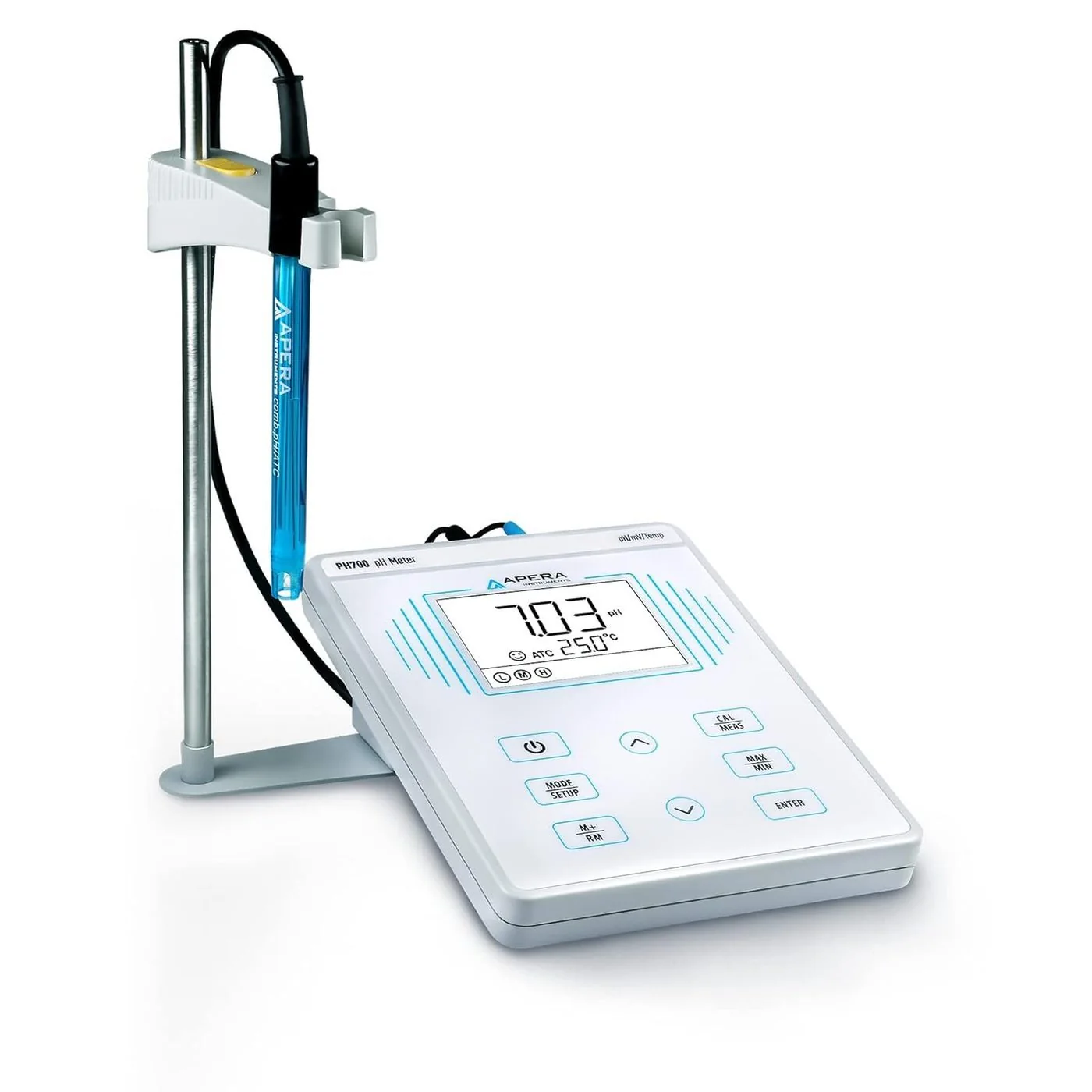
50-Point Data Log • Self-Diagnosis Er1–Er5 • Electrode Slope Display • Max/Min Mode • ATC/MTC • AC Powered
Source: Apera Instruments PH700 User Manual v4.1.2 • AI501 • 4.6 stars (174+ reviews) • 100+ bought/month • $262.46
PH700 vs PH60 vs PC60 — Choosing the Right Apera Instrument
| Feature | PH60 — $79.76 | PC60 — $147.58 | PH700 — $262.46 |
|---|---|---|---|
| Form factor | Portable pen | Portable pen | Benchtop (AC powered) |
| pH / mV / ORP | ✓ | pH only | ✓ |
| EC / TDS / Salinity | ✗ | ✓ | ✗ |
| Data logging | ✗ | ✗ | 50 measurement sets |
| Electrode slope display | ✗ | ✗ | Yes (after 2–3 point cal) |
| Self-diagnosis error codes | Basic | Basic | Er1–Er5 (detailed) |
| Max/Min recording | ✗ | ✗ | Yes |
| ATC + MTC | ATC only | ATC only | Both ATC and MTC |
| Best for | Field pH/ORP monitoring | Multi-param field use | Lab QC, compliance, sustained testing |
Included Electrode — 201T-F Combination Probe
The PH700 ships with the 201T-F — a plastic 3-in-1 pH/temperature combination electrode designed for general water solutions. The “3-in-1” refers to the glass pH membrane, the reference junction, and the built-in 30K NTC thermistor for automatic temperature compensation (ATC). It connects to the PH700 via both the BNC connector (pH/mV signal) and the RCA connector (temperature signal).
| 201T-F Specification | Value |
|---|---|
| pH measurement range | 2–12 pH |
| Temperature range | 10–50°C |
| Optimal sample conductivity | 100–10,000 μS/cm |
| Optimal salinity | <0.5% (low-salt water solutions) |
| Connection | BNC (pH signal) + RCA (temperature) |
| Body material | Plastic (suitable for general lab use) |
| Storage solution | 3M KCl (included; probe ships in storage vial) |
| For samples outside the 201T-F operating range (extreme pH, high temperature, high salinity, non-aqueous solvents, HF-containing samples), Apera offers the LabSen series of specialized electrodes. See aperainst.com/sensors/labsen. | |
First Use — Electrode Preparation
Loosen storage vial ring counterclockwise — remove electrode slowly
The 201T-F ships in a storage vial with 3M KCl solution. Remove slowly to avoid spilling the KCl.
Rinse electrode with pure water — blot dry with Kimwipe
Use distilled, deionized, or RO water. Blot with a Kimwipe or clean tissue using a dabbing motion — never rub the glass membrane.
Connect BNC and RCA connectors to PH700
BNC connector = pH/mV signal (threaded, twist to lock). RCA connector = temperature signal (push in until seated). Both must be connected for ATC to function.
Clip electrode into holder — perform 2–3 point calibration before first use
Never take measurements from the PH700 without calibrating first. The electrode slope displayed after calibration confirms the electrode is performing correctly.
3-Point Calibration — Complete Procedure
The PH700 calibration sequence is fixed: always pH 7.00 first (Point 1), then pH 4.00 (Point 2, acidic), then pH 10.01 (Point 3, alkaline). After each completed calibration point, the meter displays the electrode slope for that range — the key quality indicator that no portable pen meter shows.
Long press CAL/MEAS to enter calibration mode — CAL1 flashes
The CAL1 icon and pH 7.00 flash, indicating the meter is waiting for the pH 7.00 buffer. You cannot skip this step or change the order.
Rinse electrode — dip in pH 7.00 — wait for smiley face — short press ENTER
Wait for the stability icon to appear AND remain before pressing ENTER. The “End” icon and the acid-range slope value are displayed momentarily. CAL2 then flashes.
Rinse — dip in pH 4.00 — wait for stability — short press ENTER
The acid slope is displayed. “End” and CAL3 appear.
Rinse — dip in pH 10.01 — wait for stability — short press ENTER
The alkaline slope is displayed. L, M, H icons all appear — 3-point calibration complete. Meter returns to measurement mode.
Electrode Slope — The Health Indicator
After completing 2-point or 3-point calibration, the PH700 displays the electrode slope for the acidic range (after Point 2) and the alkaline range (after Point 3). This is the most informative electrode health indicator available on any Apera instrument.
Data Logging — Store, Recall, and Max/Min
Storing a Reading (M+)
When smiley face stability icon is displayed — short press M+/RM
The M+ icon and a sequential number appear confirming storage. Each press stores another reading. The meter tracks pH and mV data sets separately.
Recalling Stored Data (RM)
From measurement mode — long press M+/RM
RM icon and data numbering appear. Use Up/Down arrows to scroll through stored measurements. Long press Up or Down to scroll quickly through multiple entries.
Short press CAL/MEAS to return to live measurement
Exits recall mode without deleting stored data.
Max/Min Recording Mode
Short press MAX/MIN — MAX/MIN icons begin flashing
The meter begins recording the highest and lowest pH (or mV) readings observed during the session from this point forward.
At end of session — short press MAX/MIN to display results
The meter alternately displays the maximum and minimum values recorded during the session.
Short press CAL/MEAS to return to normal measurement
Max/Min data is cleared when you exit the mode.
Self-Diagnosis Error Codes — Er1 through Er5
The PH700 provides the most detailed error code system of any Apera instrument. These codes discriminate between five specific fault categories, allowing faster diagnosis than the generic error indicators on portable meters.
| Error Code | Meaning | Immediate Action |
|---|---|---|
| Er1 | Electrode not connected or BNC connector is loose | Check BNC connection; twist to lock fully; verify electrode is plugged in |
| Er2 | Electrode broken or damaged beyond recovery | Replace the 201T-F electrode. Er2 indicates the electrode cannot be recovered by cleaning or soaking. |
| Er3 | Calibration failed: buffer not recognized, buffer contaminated, or electrode response insufficient | Replace pH buffer solutions; deep clean electrode; soak in KCl 1 hour; retry calibration. If persistent, electrode may need replacement. |
| Er4 | Electrode slope below acceptable threshold (<~80% of theoretical) | Clean electrode thoroughly; soak in KCl 1 hour; recalibrate. If slope remains below threshold, replace electrode. |
| Er5 | Temperature sensor (RCA connector) not connected or temperature outside range | Check RCA connector is fully seated; verify sample temperature is within 0–50°C range; if using electrode without temp sensor, switch to MTC mode manually |
ATC vs MTC — Temperature Compensation Modes
| Mode | When Active | How It Works | Display Indicator |
|---|---|---|---|
| ATC (Automatic) | 201T-F electrode connected via both BNC and RCA | Built-in 30K NTC thermistor continuously measures sample temperature; meter automatically applies Nernst equation compensation in real time | Temperature displayed automatically; no MTC indicator |
| MTC (Manual) | BNC-only electrode connected (no RCA); or RCA disconnected | Operator measures sample temperature with external thermometer and manually enters value using Up/Down arrows | “MTC” displayed on LCD; temperature value flashes to indicate manual entry needed |
Electrode Cleaning — Contamination-Specific Procedures
The PH700 manual provides the most detailed contamination-specific cleaning guidance of any Apera instrument. Using the correct cleaning agent for the specific contamination type is critical — the wrong agent can damage the electrode.
| Contamination Type | Cleaning Agent | Procedure | Post-Cleaning |
|---|---|---|---|
| General contamination / standard residue | Distilled or deionized water | Rinse thoroughly; use wash bottle. Never run under tap water. | Shake off excess; blot with Kimwipe; store in KCl |
| Protein / biological contamination | 1% pepsin in 0.1M HCl solution | Soak 30 minutes; rinse thoroughly with pure water | Soak in KCl 30 min; recalibrate before use |
| Grease or oil contamination | Acetone or ethanol (brief exposure) | Rinse electrode briefly in acetone or ethanol to dissolve oils; immediately follow with thorough pure water rinse | Soak in KCl 1 hour; recalibrate before use |
| Calcium carbonate / mineral scale | 0.1M HCl (dilute hydrochloric acid) | Brief soak or rinse in dilute HCl to dissolve scale; follow with pure water rinse | Soak in KCl 30 min; recalibrate before use |
| Heavy metal sulfide stains | 0.1M EDTA solution + ammonia | Soak in EDTA solution for 30–60 minutes to chelate and remove metal deposits | Soak in KCl 1 hour; recalibrate before use |
| Residual junction blockage | Apera Cleaning Solution (AI1166) | Soak 30 minutes; gentle soft brush if needed | Soak in KCl 1 hour; recalibrate before use |
| NEVER rub the glass membrane with any material — dabbing only. NEVER use concentrated acids on the glass membrane. Always recalibrate after any cleaning procedure that involves soaking or chemical contact. | |||
Parameter Settings (P1–P5)
| Setting | Function | Options | Default |
|---|---|---|---|
| P1 | pH buffer standard series | USA (4.00/7.00/10.01) or NIST (4.00/6.86/9.18) | USA |
| P2 | pH display resolution | 0.1 pH or 0.01 pH | 0.01 |
| P3 | Temperature unit | °C or °F | °C |
| P4 | Clear data log | No / Yes — Yes permanently deletes all 50 stored measurements | No |
| P5 | Factory reset | No / Yes — Yes clears all calibration data and returns all settings to default | No |
| Access: long press MODE/SETUP from measurement mode. Short press Up arrow to advance P1→P5. Short press ENTER to select. Short press Up to change value. Short press ENTER to confirm. Short press CAL/MEAS to return to measurement mode. | |||
Troubleshooting
| Symptom | Likely Cause | Resolution |
|---|---|---|
| Er1 displayed | BNC not connected or loose | Check BNC connection; twist to lock; verify electrode is plugged in all the way |
| Er2 displayed | Electrode broken/dead | Replace 201T-F electrode; no recovery possible |
| Er3 on calibration | Contaminated buffers; poor electrode response | Replace buffer solutions; deep clean electrode; soak in KCl 1 hour; retry |
| Er4 on calibration | Electrode slope below threshold | Clean electrode; soak in KCl 1 hour; recalibrate. Replace electrode if slope stays below 85% |
| Er5 displayed | RCA connector not seated; temp out of range | Reseat RCA connector fully; verify sample is 0–50°C |
| MTC showing when ATC expected | RCA connector not seated | Check and reseat RCA temperature connector; ATC will restore automatically |
| pH reading off by consistent amount | Calibration needed; old calibration from previous electrode in memory after replacement | Recalibrate; consider P5 factory reset to clear old calibration data when replacing electrode |
| Reading drifts continuously | Electrode stored dry or in pure water; glass membrane dehydrated | Soak in 3M KCl 30–60 min; recalibrate. Sustained drift despite KCl soak = electrode replacement needed. |
Related guides and reviews
- pH Meters for Commercial Water Use — EPA 150.1/150.2 methods, the 15-minute rule, and compliance records
- pH testing in commercial water — complete guide
- How to calibrate a pH meter — step-by-step protocol
Related Apera & Hach Instrument References
- Apera PH60 (AI311) — Portable pH/mV/ORP/Temp Tester, $79.76
- Apera PC60 (AI316) — 5-in-1 pH/EC/TDS/Salinity/Temp, $147.58
- Hach DR1900 Portable Spectrophotometer — Laboratory-Grade Field Instrument
- Hach DR900 Multiparameter Colorimeter — 48+ Parameters
- Colorimeter vs Spectrophotometer — Buyer’s Guide
- Industrial Water & Wastewater Treatment Guide
- All Commercial Water Lab Guides